Adam Hinz: The Blog
Just when you think you know it all
On 2007-12-18 at 12/18/2007 02:15:00 AM...
Brendan Benson - Just Like MeIf there's one truth about going home, it's that computer problems await me. I'm our family's resident techy guy, and it usually results in at least one call a week from my Mom.
A couple weeks ago she called about her computer not booting up. She described a screwey screen with jumbled letters (which we reproduced tonight, here:
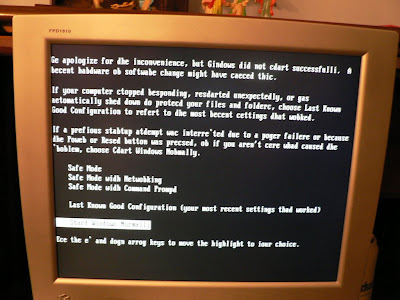 )
)Luckily, I was able to boot into safe mode, so the first thing I did was back all her pictures, documents, and emails. Next, I tried a repair install. I've never done this before, but how hard could it be?
About halfway through it complained about not finding a file on the cd: licwmi.dl_ (even though there was a licwmi.dll right in the root directory). A little google work got me to this:
http://www.daniweb.com/forums/thread51919.html
and son of a gun it worked. The steps are reproduced here for my own sake:
"So, here's the solution: I did this based off of http://support.microsoft.com/kb/818464. I rebooted off the Windows install CD, and hit R to go to the repair console. I then proceeded to delete c:\windows\security\edb.log. Then I rebooted the computer without going into the CD, and let the Windows installer continue (where in previous reboots it complained of not being able to copy files again). Once the installer loaded up, and before it could complain of not copying (which it would take about 5 minutes to get to), I hit Shift + F10. In the command prompt, I typed "esentutl /p c:\windows\security\database\secedit.sdb". And then I deleted c:\windows\security\edb0000x.log. And this time, there was no complaint of inability to copy files. Yay!"
The only thing I didn't do was delete the edb0000x.log file because it didn't exist.
So now I'm running a newly installed and barely-usably slow XP Home on the machine.
Now for some reason it can't grab an ip. Stay tuned!